How to add/fix documentation
We decided to use Github to host our documentation and Sphinx to generate it. Sphinx allows us to create automatic docs in HTML, LaTeX, or PDF from the docstrings of Python and C code. In addition, it uses a relatively simple ASCII test format (reST) that can be easily edited on any platform, yet create a good documentation website.
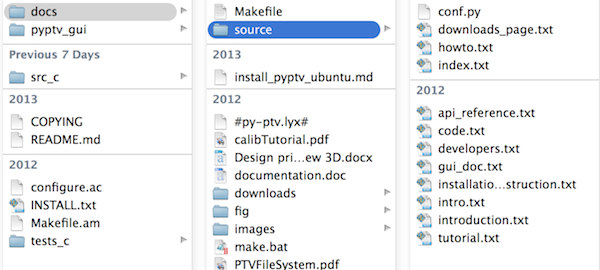
The source files of the documentation are in the openptv-python/docs/source directory, and
the respective images are in docs/images directory
If you want to add/fix documentation, then:
fork the
openptv-pythonrepositoryadd the document using reST http://sphinx-doc.org/rest.html#lists-and-quote-like-blocks
add images to
imagesdirectory and downloads todownloadsdirectory
If you wish to see the result in HTML, then
download and install Sphinx http://sphinx-doc.org/latest/install.html
run `` make html `` from
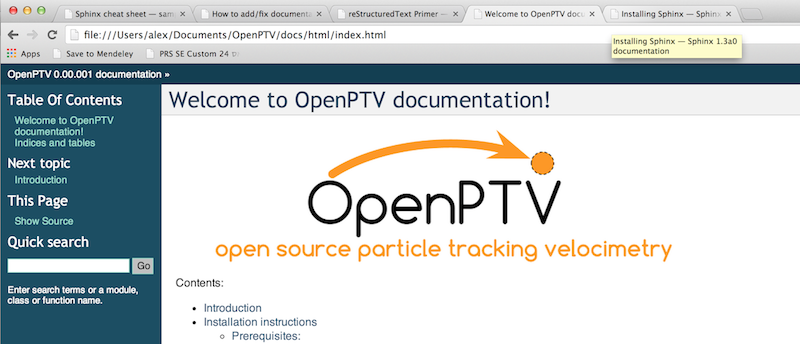
openptv-python/docsdirectory to generate your local copy of the documentation. Use your browser to see../../docs/html/index.html
For example:
cd /Users/alex/openptv-python/docs
make html
The result may look like:
5. When the documentation is ready - please submit your pull request and the group will review the submission.
Eventually, using the same setup we will regenerate the HTML and push it to the documentation repository under http://www.openptv.net/docs (see for example http://alexlib.github.io/docs)